The shape of the failure
Consent Mode v2 is a system where the most common ways it breaks are silent. The site keeps loading. The banner keeps showing. Analytics keep reporting something. The failures reveal themselves weeks later, when someone compares platform numbers to warehouse numbers and the gap is too large to hand-wave.
Consent Mode v2 failures rarely look like failures. A broken consent configuration does not throw console errors, does not return 500s, and does not visibly change the site. Pageviews still fire. Events still flow. The numbers look plausible.
What breaks is the signal quality underneath. Tags fire before consent is resolved, meaning cookieless pings are treated as full sessions. Ad-platform conversion APIs return data the platforms silently discard because the consent state was never propagated. Google's smart-bidding algorithms quietly shift spend away from channels that look like they've stopped converting, which is most of them in lockstep, because the measurement pipeline is broken end to end.
By the time someone notices, two to six weeks of decisions have been made on bad data. Most of the commercial damage is in that decision lag, not the reporting gap itself.
The checks below are written for a Google-centric stack (GTM, GA4, Google Ads, Meta via CAPI). The principles translate directly to server-side setups (sGTM, Elevar, Addingwell, Stape) and to Meta and TikTok pixel-led configurations, with vendor-specific consent hooks in place of gtag.
This check is written against UK GDPR and EU GDPR requirements, calibrated to the strictest enforcement regime in the bloc (CNIL, France). The seven checks apply directly under Quebec's Law 25 and are safer-than-required under Canadian PIPEDA, other provincial Canadian acts, and US state privacy laws such as CCPA/CPRA. If a deployment serves visitors in any UK or EU market, the default-deny posture below is not optional. For multi-market deployments, default-deny satisfies every jurisdiction this article addresses.
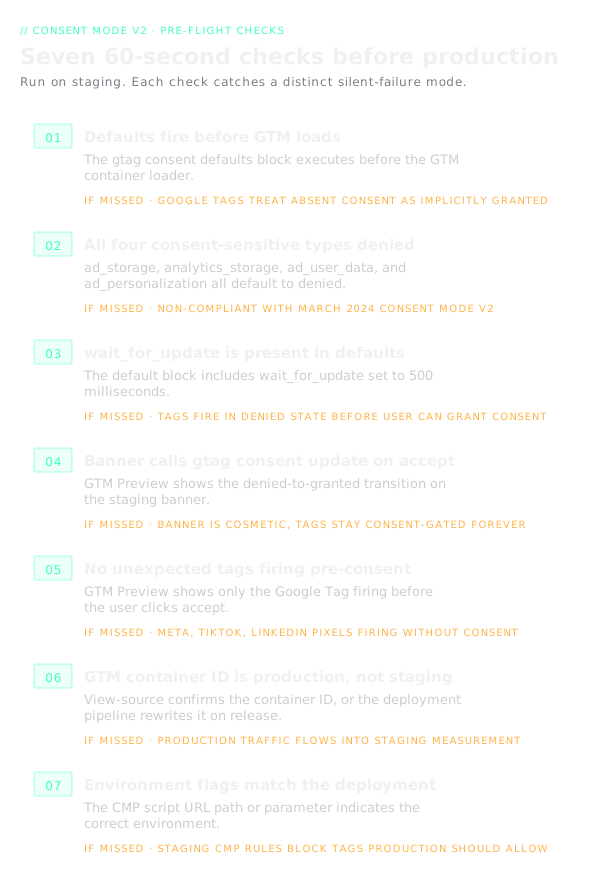
Check 01: Consent defaults fire before GTM
The consent defaults script must execute before the GTM container loader. If GTM loads first, any tag inside it that respects Consent Mode v2 will initialise with no consent state declared. Google tags treat that as implicitly granted, so they fire normally and send full-behaviour hits that should have been gated.
In view-source, the order should be: gtag('consent', 'default', {...}) script block, then the GTM loader (function(w,d,s,l,i){...}) block. If the order is reversed, move the consent defaults into a blocking script before the GTM snippet.
Common cause of failure: CMPs that advertise themselves as "GTM-compatible" sometimes inject consent defaults via a tag inside GTM itself, which executes too late. The defaults must be inline in the page HTML, not deferred.
Check 02: All four consent-sensitive types are denied by default
Consent Mode v2 defines four types that must be set to denied in default state:
ad_storageanalytics_storagead_user_data(added March 2024)ad_personalization(added March 2024)
Two more types can be granted by default because they cover non-consent-requiring processing:
functionality_storage(language preferences, session persistence)security_storage(fraud prevention, abuse detection)
If ad_user_data or ad_personalization are missing, the setup predates the March 2024 Consent Mode v2 update and is non-compliant. Every configuration deployed before that date needs reviewing.
Check 03: wait_for_update is present in defaults
The wait_for_update parameter tells tags to hold for a specified number of milliseconds before firing, giving the consent banner time to resolve. Without it, tags fire immediately on page load with the default denied state, sending cookieless pings before the user has had any chance to grant consent.
500ms is a sensible default. Shorter risks races with slow-loading banner scripts; longer adds user-facing latency to any tag that's meant to fire post-consent.
Check: the defaults call should include 'wait_for_update': 500. If absent, add it. If set to 0 or a very low value, raise it.
Check 04: The banner actually calls gtag consent update on accept
Many consent banners set a cookie or local storage value on accept but never call gtag('consent', 'update', {...}). The cookie is set, the banner dismisses, and the site appears to be working. Tags remain gated in their default denied state forever.
This check requires actually clicking Accept on the staging banner and watching what happens in GTM Preview mode. Open the Consent tab (next to Summary, Variables, Data Layer) and select an event that fired after the click. The On-page Update column should show the relevant consent types transitioning from "denied" to "granted".
If the update column stays empty, the banner is cosmetic. The fix is usually a one-line addition to the banner's accept handler.
Check 05: No unexpected tags firing pre-consent
In GTM Preview mode on the staging site, before clicking the consent banner, check the Tags Fired panel. On a well-configured site the only tag firing on Consent Initialization should be the Google Tag itself (in cookieless mode), plus any strictly functional tags.
If Meta Pixel, TikTok Pixel, LinkedIn Insight Tag, Reddit Pixel, or other third-party marketing tags are firing before consent is granted, the site is non-compliant. Each tag needs consent gating added inside GTM, either via built-in consent checks (for tags that support Consent Mode v2) or via a blocking trigger tied to a consent state variable.
The failure mode: tags were copied in from an older container or a different property where consent gating wasn't configured, and nobody audited them on the new environment.
Check 06: The GTM container ID is production, not staging
This is the check that typically gets skipped because it feels too obvious to miss. It's also the check that most frequently fails on domain migrations and environment copies.
In view-source on the staging site, search for the GTM container ID in the GTM snippet. Confirm it matches the intended production container. If the staging environment is serving the staging container (for pre-production testing), confirm the production deployment pipeline replaces it with the production ID on release.
Common failure: staging environment keeps serving the staging GTM container after it's been promoted to production, because the container ID was hardcoded in a template rather than injected from environment config. Every tag inside the staging container continues to fire on production pageviews, which at best sends bad data to a test property and at worst sends production visitor data to a container that isn't hardened for live traffic.
Check 07: Environment flags match the deployment target
Most CMPs (OneTrust, Cookiebot, Didomi, TrustArc, Osano) allow multiple environment configurations under a single account: development, staging, production, and occasionally per-market variants. Each configuration has its own script URL, its own categorisation rules, and its own banner behaviour.
The staging environment should load the staging CMP script during pre-production testing. The production environment must load the production CMP script after release. A staging CMP script running in production will apply staging rules, which typically means aggressive default-deny behaviour that blocks tags the production configuration would allow.
Check: view-source on the staging site, find the CMP script URL, and confirm whether the path or parameter indicates staging or production. On the production deployment, repeat the check after release.
Running the check
Block 15 minutes before any production release that touches tracking. Open GTM Preview mode connected to the staging URL. Work through the seven checks in order. Document any failures and fix them before release.
The asymmetry of cost and benefit on this check is the reason it's worth institutionalising. The check takes 15 minutes. A silent failure costs two to six weeks of decision latency on bad data, plus the direct revenue impact of smart-bidding defunding working channels. The cheapest insurance in performance marketing is also the most frequently skipped.
A clean consent layer is the upstream condition for everything else in the measurement stack: Enhanced Conversions and CAPI cannot recover signal that was never captured, and the two-layer measurement model assumes the signal layer is intact before MMM cross-checks against it.